Deploying Endatix on Azure
Endatix consists of two primary bounded contexts: the Endatix API (.NET 10 backend) and the Endatix Hub (Next.js frontend). Both can be natively deployed to Azure using our included Infrastructure as Code (Bicep) templates.
Whether you are looking to spin up a quick sandbox, or you are looking to plan and provision a production-ready environment, this guide covers the core architecture and the right deployment path for you.
Do you prefer a containerized local sandbox? Check out our Docker Setup Guide.
🏗️ Azure Solution Architecture
The Endatix Azure deployment utilizes a modern, scalable, and secure architecture. Using our Bicep templates and parameter files, the following core resources are provisioned:
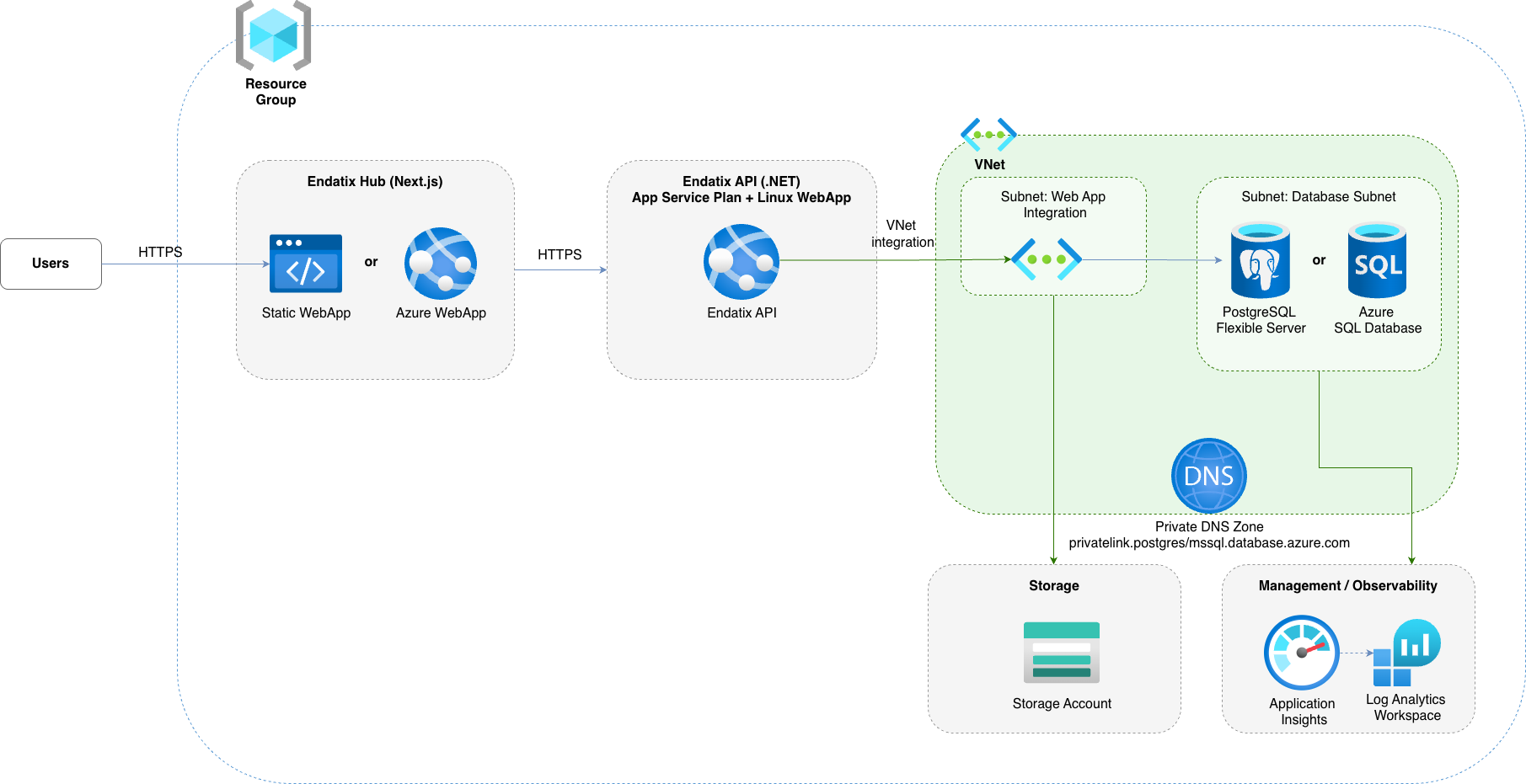
- Endatix API: Deployed as an App Service (Linux Web App) running on a shared App Service Plan. It handles core business logic, form submissions, and data management.
- Endatix Hub: The Next.js management frontend. Depending on your configuration (
hubDeploymentMode), this is deployed either as an Azure Static Web App (default, highly cost-effective) or as a dedicated App Service Web App (Node.js runtime). - Database (PostgreSQL or Azure SQL): Endatix supports both Azure Database for PostgreSQL Flexible Server and Azure SQL Database (MS SQL Server). For PostgreSQL, allowlist
pg_trgm(azure.extensionsmust includePG_TRGM) before migrations — see System Requirements. The sample Bicep Postgres module sets this parameter for you. - Storage Account: Manages form submission files and assets. Includes specific containers and blob configurations. Blobs can be configured as public or private by toggling the
storageIsPrivateparameter. - Application Insights: Integrated with a Log Analytics workspace, this provides out-of-the-box distributed tracing, application performance monitoring, and OpenTelemetry (OTel) compatibility.
- Virtual Network (VNet) [Optional]: For production-ready environments, you can set
enablePostgresqlPrivateNetworktotrue. This provisions a managed VNet (or integrates with your own), securing the PostgreSQL database by removing public internet access and ensuring traffic only flows securely from the Endatix API.
🚀 Deployment Paths
We provide a comprehensive, interactive deployment guide and scripts within the Endatix repository.
Choose the path that matches your current goal:
- ⚡️ Quick Setup
- 🌐 Going Live
Use this path when you want to evaluate Endatix quickly on Azure without setting up CI/CD first.
- Interactive setup: Run the generate-quickstart-secrets CLI. The script generates secure secrets, creates your
parameters.production.bicepparamfile, and provisions infrastructure via Azure CLI. - Local build and deploy: Build the .NET API and Next.js Hub locally, then deploy artifacts to Azure App Service and Static Web App using
az webapp deploymentandswa cli.
node generate-quickstart-secrets.mjs
Use this path when you are preparing a stable, auditable deployment pipeline in Azure or planning your Azure architecture.
- Fork and configure: Fork endatix and endatix-hub repos.
- Provision infrastructure: Use the endatix-azure.template.bicep as starting point. It's not fully production ready, but it will help you with almost everything you need. You will only need to tweak the setup to meet your corporate standards - e.g. geo redundancy, data retention, high availability, security & additional protection e.g. Azure FrontDoor, CDN, custom hostnames, certificates and etc.
- Automate Hub deployment: We have prepared an example GitHub action. Review it, pick your Hub hosting mode (Static Web App or Web App) and tailor the workflow to your needs.
For production or internet-facing environments, apply the following recommendations:
- Allowlist
pg_trgmon PostgreSQL Flexible Server: Required before API migrations when using PostgreSQL — see System Requirements. - Use private database networking: Set
enablePostgresqlPrivateNetwork=trueso PostgreSQL is not exposed to public internet traffic. Use managed VNet or integrate with your existing VNet/subnets. - Keep blob storage private by default: Set
storageIsPrivate=trueunless your scenario explicitly requires public blob access. Grant access via SAS tokens, managed identities, or controlled backend endpoints. - Encrypt data at rest and in transit: Use Azure-managed encryption at rest for Storage and PostgreSQL (or Customer-Managed Keys via Key Vault if required by policy). Enforce TLS for all app, API, and database traffic.
- Do not store secrets in source control: Keep keys, signing secrets, connection strings, and credentials in secure secret stores (for example, GitHub Environments + Azure Key Vault) and rotate them regularly.
- Apply least privilege access: Restrict Azure RBAC roles, use managed identities where possible, and avoid broad Contributor/Owner access for CI/CD service principals.
- Enable monitoring and alerting: Keep Application Insights and Log Analytics enabled, configure security/audit log retention, and add alert rules for suspicious auth failures, unexpected traffic patterns, and deployment drift.
- Harden public endpoints: If API/Hub must be public, add protections such as IP restrictions, WAF/Front Door, rate limiting, secure headers, and strict CORS policies.
- Plan backup and recovery: Configure PostgreSQL backups/PITR, validate restore procedures, and define data retention and disaster recovery targets (RPO/RTO) up front.