Reverse Proxy Deployment
Endatix can run behind a reverse proxy such as Nginx, Apache, Cloudflare, Azure Application Gateway, or a Kubernetes ingress. This page focuses on forwarded headers, scheme/host preservation, and TLS behavior at the API.
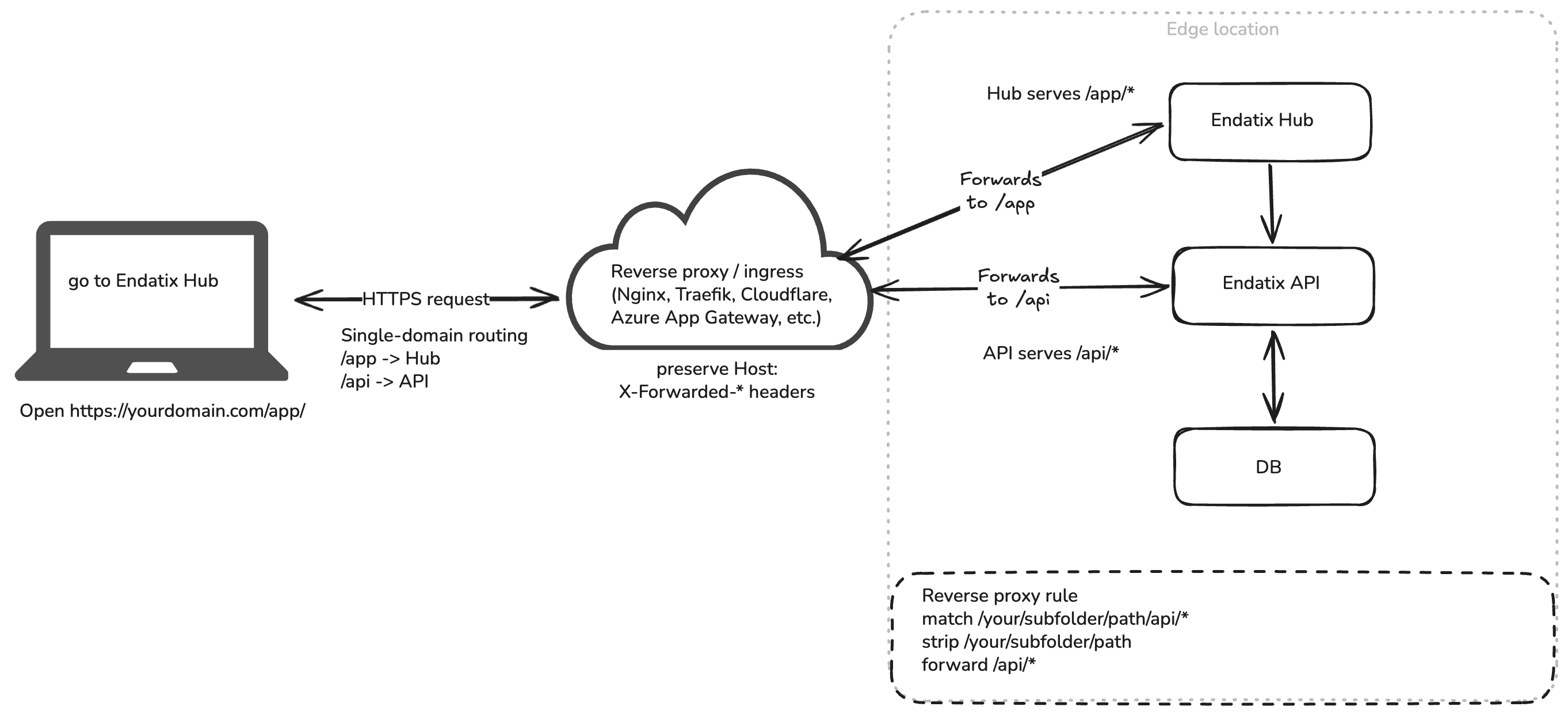
If you need to serve the Hub or API under specific path prefixes (such as /app and /api), start with the Subfolder Deployment guide, then apply the reverse-proxy settings below. Hub needs AUTH_URL and usually AUTH_TRUST_HOST=true — Hub environment variables.
Why Forwarded Headers Matter
Reverse proxies typically terminate TLS (HTTPS) and forward traffic to the internal applications over plain HTTP. Without forwarded headers, the Endatix API sees the internal request (e.g., http://localhost:5000) instead of the public request (e.g., https://yourdomain.com).
Failing to pass these headers causes incorrect URL generation, broken Swagger documentation links, and authentication failures (as browsers will drop secure authorization cookies after cross-origin or cross-scheme redirects).
Endatix Hub Configuration
When the Hub is behind a proxy, you must configure Auth.js to inherently trust the public host. For a single-domain /app subfolder setup, adjust your .env.local variables:
NEXT_PUBLIC_BASE_PATH=/app
ENDATIX_BASE_URL=https://yourdomain.com
ENDATIX_API_PREFIX=/api
AUTH_URL=https://yourdomain.com/app/api/auth
AUTH_TRUST_HOST=true
AUTH_TRUST_HOST=true is strictly required when Auth.js runs behind a reverse proxy. See the Endatix JWT authentication guide for more details on Hub authentication settings.
Endatix API Configuration
You must explicitly enable reverse-proxy hosting in your API's appsettings.json (or via environment variables):
{
  "Endatix": {
    "Hosting": {
      "ReverseProxy": {
        "Enabled": true,
        "TrustAllProxiesInDevelopment": true
      }
    }
  }
}
With this setting enabled, Endatix processes X-Forwarded-* headers early in the .NET middleware pipeline.
By default, HSTS and HTTPS redirection are disabled when the proxy is enabled, as TLS is expected to be terminated at the edge. If the Endatix API must still own those security policies, explicitly set Endatix:Hosting:UseHsts and Endatix:Hosting:UseHttpsRedirection to true.
Your Program.cs application startup can remain minimal:
var builder = WebApplication.CreateBuilder(args);
builder.Host.ConfigureEndatix();

var app = builder.Build();
app.UseEndatix();

app.Run();
Reverse Proxy Headers
Your proxy must be configured to preserve the original public request details. Ensure the following headers are passed to both the Hub and the API:
| Header | Purpose |
|---|---|
Host | Keeps generated redirects and share links tied to the public host and port. |
X-Forwarded-For | Preserves the original client IP chain. |
X-Forwarded-Host | Preserves the external host address. |
X-Forwarded-Proto | Preserves the external scheme (http or https). |
If you are using Nginx for local development on a non-standard port (e.g., localhost:8080), you must use proxy_set_header Host $http_host; instead of $host. The $host variable strips the port, causing Next.js and .NET to issue broken redirects back to port 80.
Additionally, Next.js automatically enforces trailing slashes (redirecting /app to /app/). To prevent Nginx from dropping the port during this redirect, ensure you add absolute_redirect off; to your Nginx server block.
Local Reverse Proxy Sample
The Endatix repository includes a ready-to-use local Nginx sample at /samples/reverse-proxy/
Use this Docker Compose environment to test the exact public routing shape locally:
- Hub UI:
http://localhost:8080/app/ - API & Swagger:
http://localhost:8080/api/
The sample's README includes the required Hub environment variables, the matching API configuration, and the startup commands.