Carry Forward
Carry Forward lets you populate a choice-based question from answers on one or more earlier questions — without maintaining duplicate option lists or helper questions. Enable Carry forward from other questions on the destination question, pick your sources, and Endatix Hub keeps the choice list in sync as respondents answer the form.
Use Carry Forward for follow-up questions that should only show relevant options — for example, rating attributes for brands the respondent already selected, or asking about flavors for products they said they purchased.
Carry Forward is available on all choice-based question types:
- Check boxes (Multiple Choice)
- Radio group (Single Choice)
- Dropdown (Single Choice)
- Multi-select Dropdown (Tag Box)
- Image Picker
- Ranking
- Button group
Source questions must also be choice-based (select) questions. The current question cannot be its own source.
Key Capabilities
- Multiple sources: Copy choices from more than one earlier question into a single destination list.
- Selection modes: Copy All options, Selected options only, or Unselected options only from each source.
Lazy-loaded sources (for example, Choices from data list) always contribute Selected options only — including selections that are not on the currently loaded page — even when the mode is All or Unselected. See Limitations.
- Deduplication: Identical choice values from different sources appear once in the destination list.
- Priority items: Pin specific choices to the top of the list in a fixed order.
- Randomization support: When Choice order is set to Random, priority items stay fixed while the remaining choices shuffle.
- Maximum number of choices: Cap how many non-priority options appear in the destination list.
- Live updates: The destination list refreshes when source answers change or when you edit carry-forward settings in the Form Builder.
- Blind Search compatibility: On Tag Box questions, Carry Forward works together with Blind Search — carry forward builds the pool; blind search controls when and how it is filtered.
Configuration Guide
Select a choice-based question that should receive copied options. In the Property Grid, open the Choices category and configure Carry Forward.
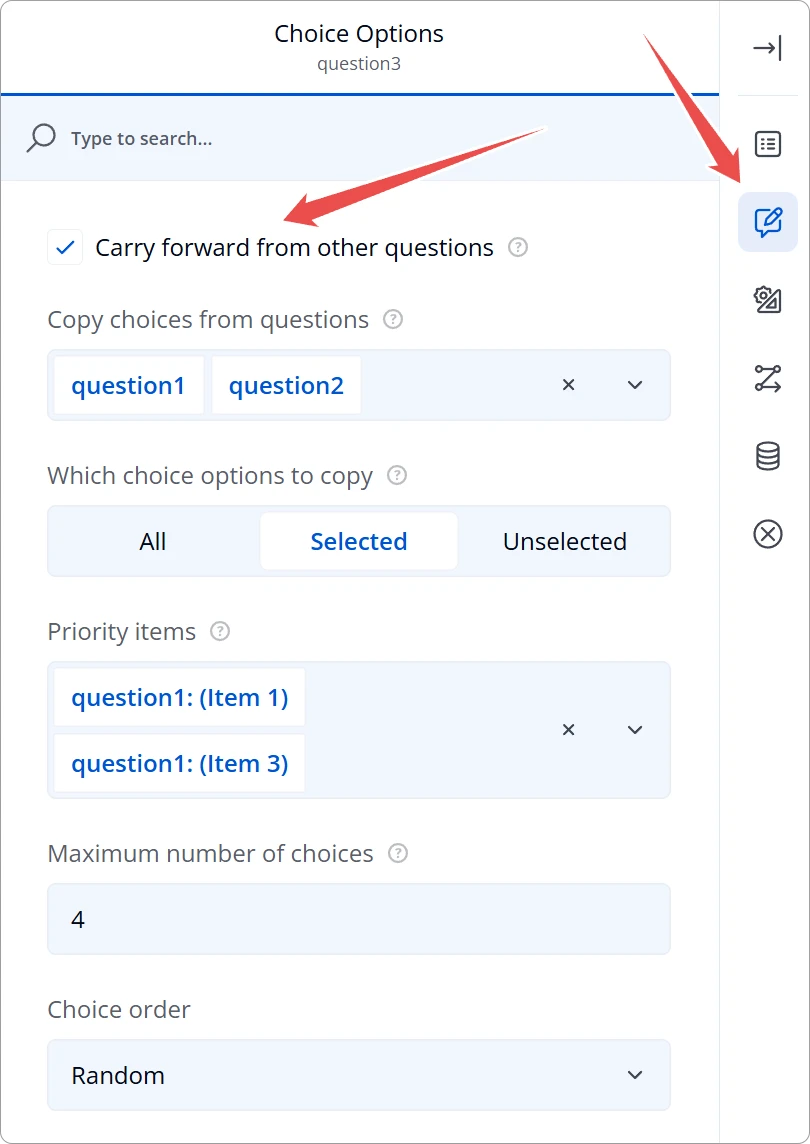
1. Enable Carry Forward
Turn on Carry forward from other questions.
When Carry Forward is enabled:
- The inline Choices editor is hidden — the list is managed by carry-forward rules.
- Choices from data list, Choices from URL, and SurveyJS Choices from question are not available on the same question (they are mutually exclusive).
2. Select Source Questions
Choose one or more earlier questions under Copy choices from questions. Only choice-based questions appear in the list; the current question is excluded.
If multiple sources contain the same choice value, it appears once in the destination list. Text and media (such as image picker thumbnails) are preserved from the first source where the value appears.
3. Choose Which Options to Copy
Set Which choice options to copy to control what is taken from each source:
| Mode | Behavior |
|---|---|
| All | Copies every choice option defined on each source question, regardless of what the respondent selected. Requires a fully loaded (inline) choice catalog on that source. |
| Selected | Copies only options the respondent selected on each source. Updates dynamically as answers change. Works with both inline and lazy-loaded (data list) sources. |
| Unselected | Copies only options the respondent did not select on each source. Updates dynamically as answers change. Requires a fully loaded (inline) choice catalog on that source. |
Sources that load choices on demand (typically Choices from data list) never materialize the full catalog in the browser. For those sources, Carry Forward always copies Selected options only — including selections that are not on the currently loaded page — even when this setting is All or Unselected. Inline sources in the same destination still honor All / Unselected.
For Ranking source questions, Selected and Unselected follow the ranking value (typically the full ranked list), not a partial checkbox-style selection.
In Selected mode, choices reflect what the respondent actually answered on each source, including Other write-in values when applicable.
4. Optional — Set Priority Items
Use Priority items to pin specific choices at the top of the destination list, in the order you select them. Priority items are always included, even when a maximum choice limit is set.
To shuffle the remaining (non-priority) choices while keeping priority items fixed, set Choice order to Random on the Choices tab. See Randomization of Choices for related choice-order options.
5. Optional — Limit the Choice List
Set Maximum number of choices to cap how many options appear in the destination list after carry forward runs.
| Value | Behavior |
|---|---|
| 0 (default) | No limit — all matching choices are shown. |
| 1 or more | Limits non-priority choices. Priority items are always included first; the cap applies to the remaining slots. |
Example: With four source choices (A, B, C, D), priority item D, and Maximum number of choices set to 2, the destination list shows D and one other choice (for example D, A).
Respondent Experience
How the list is built
When a respondent reaches the destination question, Endatix Hub:
- Reads answers from each configured source question.
- Collects choices according to the selected mode (All, Selected, or Unselected). Lazy-loaded sources always contribute Selected options only.
- Merges and deduplicates choices across sources.
- Applies priority ordering and any maximum choice limit.
- Applies randomization rules if Choice order is set to Random.
If a source answer changes later in the form (for example, the respondent revisits an earlier page), the destination list updates automatically. Selections that are no longer valid are cleared.
Chained carry forward
You can configure Carry Forward on multiple questions in sequence — for example, copy from question A to question B, then from question B to question C. Endatix resolves dependencies so downstream questions update in the correct order when upstream answers change.
With Blind Search (Tag Box)
On Multi-select Dropdown (Tag Box) questions, Carry Forward and Blind Search can be used together:
- Carry Forward builds the choice pool from source answers.
- Blind Search hides that pool until the respondent types enough characters, then filters it.
Configure both features independently in the Choices category — neither setting hides the other.
Example Scenario
You survey beverage preferences:
- Question 1 — Check boxes: "Which brands have you purchased?" (
brands_purchased) — inline list of brands. - Question 2 — Radio group: "Which brand do you prefer most?" (
favorite_brand) — same brand list. - Question 3 — Check boxes: "Which flavors have you tried for your preferred brand?" (
flavors_tried)
Configure question 3:
- Carry forward from other questions: On
- Copy choices from questions:
brands_purchased,favorite_brand - Which choice options to copy: Selected
- Priority items: The respondent's favorite brand (if listed in sources)
- Maximum number of choices:
5 - Choice order: Random (non-priority flavors shuffle)
Respondents only see flavors for brands they actually selected, with their favorite brand pinned at the top and at most five options total.
Limitations and Mutual Exclusion
Carry Forward cannot be combined with these choice sources on the same (destination) question:
| Choice source | Compatible with Carry Forward? |
|---|---|
| Inline choices (manual list) | Replaced by carry forward when enabled |
| Choices from data list | No — disable carry forward or remove the data list binding |
| Choices from URL | No |
| SurveyJS Choices from question (single source) | No — use Carry Forward instead for multi-source scenarios |
Lazy-loaded source questions
A source question may use Choices from data list (or any lazy-loaded catalog). That is supported, with one mode constraint:
| Destination mode | Inline source | Lazy-loaded / data-list source |
|---|---|---|
| All | Copies every defined choice | Contributes Selected only |
| Selected | Copies selected choices | Copies selected choices (including off-page) |
| Unselected | Copies unselected choices | Contributes Selected only |
This keeps large catalogs practical: the browser never needs to load thousands of unselected items to build the destination list.
Carry Forward choice lists are driven by respondent answers. Use Preview in the Form Builder (or the published form) to see the live list update as you change source answers. In the static design surface, destination choices may appear empty until preview data is available.
Technical Reference (JSON Schema)
Advanced users and template authors can configure Carry Forward directly in the form JSON on any supported choice-based question.
{
  "type": "checkbox",
  "name": "flavors_tried",
  "title": "Which flavors have you tried?",
  "edxCarryForwardEnabled": true,
  "edxCarryForwardSources": ["brands_purchased", "favorite_brand"],
  "edxCarryForwardMode": "selected",
  "edxCarryForwardPriorityItems": ["coca_cola"],
  "edxCarryForwardMaxChoices": 5,
  "choicesOrder": "random"
}
Carry Forward Properties
| Property | Type | Default | Description |
|---|---|---|---|
edxCarryForwardEnabled | boolean | false | Master toggle. When true, the question's choice list is built from configured sources. |
edxCarryForwardSources | string[] | [] | Names of one or more earlier choice-based source questions. |
edxCarryForwardMode | string | "all" | "all", "selected", or "unselected". Controls which options are copied from each source. Lazy-loaded sources always contribute as "selected". |
edxCarryForwardPriorityItems | string[] | [] | Choice values pinned to the top of the destination list, in array order. |
edxCarryForwardMaxChoices | number | 0 | Maximum number of choices in the destination list. 0 means unlimited. Priority items always count toward the list but are never dropped by the cap. |
Mode Values
| JSON value | Creator label | Description |
|---|---|---|
"all" | All | Copy every choice from each source question. Lazy-loaded sources contribute selected choices only. |
"selected" | Selected | Copy only choices the respondent selected on each source. Supported for inline and lazy-loaded sources. |
"unselected" | Unselected | Copy only choices the respondent did not select on each source. Lazy-loaded sources contribute selected choices only. |
Example — Tag Box with Blind Search
{
  "type": "tagbox",
  "name": "brand_attributes",
  "title": "Select attributes for your chosen brands",
  "edxCarryForwardEnabled": true,
  "edxCarryForwardSources": ["brands_used"],
  "edxCarryForwardMode": "selected",
  "edxHideUntilTyping": true,
  "edxMinSearchLength": 2,
  "searchMode": "contains",
  "showOtherItem": true
}
See Blind Search for details on edxHideUntilTyping and related Tag Box properties.
Example — Image Picker with Media
Choice media such as imageLink on Image Picker sources is copied to the destination when present:
{
  "type": "imagepicker",
  "name": "preferred_packaging",
  "title": "Which packaging do you prefer?",
  "edxCarryForwardEnabled": true,
  "edxCarryForwardSources": ["packaging_seen"],
  "edxCarryForwardMode": "selected"
}