Text Piping
What Is Text Piping?
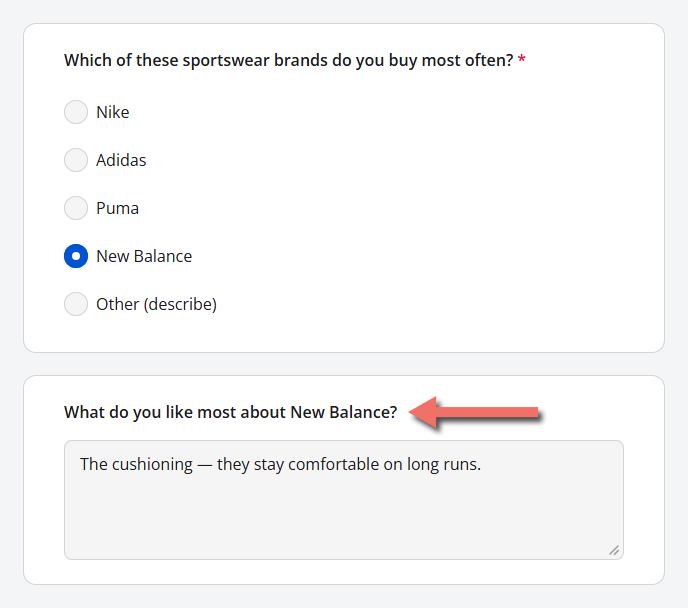
Text piping inserts an answer the respondent has already given into the wording of what they see next. Instead of a generic "What do you like most about this brand?", the follow-up question reads "What do you like most about New Balance?" — built from the respondent's own choice and updated the moment they make it.
Referring back to earlier answers keeps respondents oriented, keeps questions short, and makes a form feel more like a conversation than a checklist. It's long been a staple of market research questionnaires, where a follow-up about the brand, product, or ad concept someone just picked leaves no doubt about which one you mean. The same technique fits just as well in customer-experience surveys that name the product being rated, patient intake forms that ask how long a reported symptom has lasted, employee surveys that mention the respondent's own team, or event registrations that confirm a chosen session by name.
In Endatix Hub, you pipe a value by typing the name of the question that holds it inside curly braces — for example, {favorite_brand} — in a question's title or description. No logic rules or custom code are required.
How It Works
- Placeholders use question names, not titles.
{favorite_brand}refers to the question whose Question name isfavorite_brand. Letter case doesn't matter. - Choice questions insert the choice text. When the respondent selects New Balance, the placeholder shows
New Balance— the text they saw — rather than the stored valuenew_balance. - Updates are live. If the respondent goes back and changes their answer, every piped reference updates immediately.
- Placeholders are replaced only when the form is filled out. In the Designer tab they appear exactly as typed; switch to Preview (or open the published form) to see the result.
Example: Piping a Selected Brand into a Follow-up Question
A brand perception survey asks which sportswear brand the respondent buys most often — a multiple-choice question with a single answer — then asks what they like most about that brand.
| # | Question type | Question name | Title |
|---|---|---|---|
| 1 | Radio Button Group | favorite_brand | Which of these sportswear brands do you buy most often? |
| 2 | Long Text | favorite_brand_reason | What do you like most about {favorite_brand}? |
Question 1 lists Nike, Adidas, Puma, and New Balance, plus an Other option.
1. Find the Source Question's Name
Select the multiple-choice question on the design surface. Its name is shown in the Property Grid under the General category, in Question name.
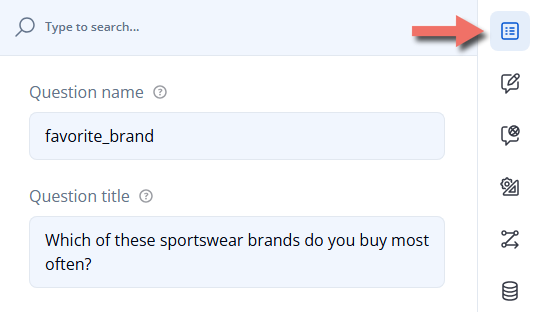
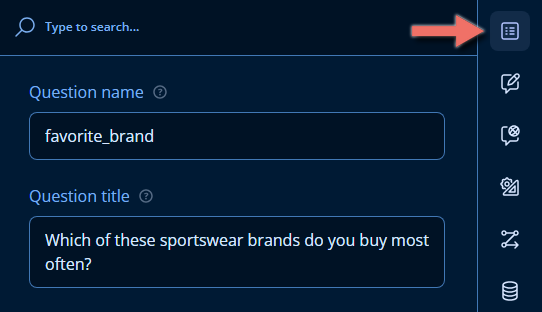
New questions get generic names such as question1. Rename the question to something descriptive — like favorite_brand — before you reference it. Renaming a question later updates its references in logic conditions, but not the placeholders typed into titles, descriptions, or choice text; those need to be edited by hand.
2. Add the Placeholder to the Follow-up Question
Click the follow-up question's title on the design surface (or select the question and edit Question title in the Property Grid), and type the source question's name in curly braces where the answer should appear:
What do you like most about {favorite_brand}?


3. Show the Follow-up Only When There's an Answer to Pipe
When both questions share a page — or the source question is optional — the follow-up could appear before a brand is chosen and read "What do you like most about ?". Prevent that by setting the follow-up question's Make the question visible if condition (Property Grid → Conditions) to:
{favorite_brand} notempty
Alternatively, give the placeholder fallback text with Default display value for dynamic texts — see Fine-tuning the Piped Text.
4. Preview the Result
Open the Preview tab and select a brand. The follow-up question appears with that brand's name in its title:
What Gets Inserted
| Source | Inserted text | Example |
|---|---|---|
| Radio Button Group, Dropdown | The selected choice's text | New Balance |
| Checkboxes, Multi-Select Dropdown, Ranking | The texts of all selected choices, separated by commas, in the order they were selected (or ranked) | Nike, Puma |
| The Other option | The text the respondent typed into the Other box | Asics |
| Yes/No (Boolean) | The label of the chosen answer | Yes |
| Single-Line Input, Long Text, Rating Scale | The answer as entered | 4 |
| A custom variable or calculated value | Its current value | Jordan |
| An unanswered question | Nothing — or the Default display value for dynamic texts, if set | What do you like most about ? |
| A name that doesn't match any question or variable | The placeholder itself, unchanged | {favorite_brnd} |
Piping from a Multiple-Selection Question
If the source is a Checkboxes question, every selected brand is inserted as a comma-separated list. Word the title so it reads naturally with one brand or several:
How satisfied are you with the brands you've bought ({brands_purchased})?
A respondent who selected Nike and Puma sees: "How satisfied are you with the brands you've bought (Nike, Puma)?"
To ask a separate set of follow-up questions for each selected brand, use Question Loops instead. To turn those selections into the choice list of a later question, use Carry Forward.
Fine-tuning the Piped Text
Two settings on the source question control what its placeholder displays. Select the source question and open the Data category in the Property Grid:
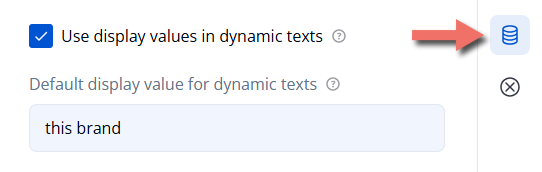
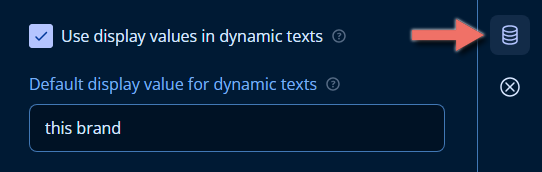
- Use display values in dynamic texts (on by default) — inserts the choice text. Clear it to insert the stored choice value instead:
new_balancerather thanNew Balance. The setting applies everywhere the question is piped. - Default display value for dynamic texts — fallback text inserted while the question is unanswered. Set to
this brand, the follow-up reads "What do you like most about this brand?" until a brand is chosen.
Neither setting changes what's saved with the submission, which always stores the choice value (new_balance).
Where You Can Use Piped Text
Placeholders work in the text a respondent reads, including:
- Question titles and descriptions
- Page and panel titles and descriptions
- Choice text — for example, a choice reading
Yes, I'd buy {favorite_brand} again - The content of an HTML question
- The survey's "Thank You" page markup
Inside a Dynamic Panel, reference another question in the same panel with the panel. prefix, such as {panel.brand_name}. See Question Loops for the loop-specific placeholders.
Piping Pre-filled Values
Earlier answers aren't the only values you can pipe. Custom variables filled in from the form's link — for example, ?brand_name=Spotify — use the same {name} syntax, so a personalized campaign link can put a brand or the respondent's first name into the form's wording before they've answered a single question.
See Pre-filling and Personalization to declare those variables and pass their values through the URL.
Important Considerations
- Pipe from questions the respondent answers earlier in the form — ideally on a previous page. A placeholder that refers to a later question stays empty until that question is answered.
- Renaming a question does not update placeholders that refer to it. Logic conditions follow the rename; titles, descriptions, and choice text don't.
- A placeholder that still appears as raw text in the live form (such as
{favorite_brnd}) doesn't match any question or variable name — check its spelling against Question name. - When translating a form, keep placeholders unchanged in every language — for example,
Was gefällt Ihnen an {favorite_brand} am besten?. The inserted choice text follows the respondent's selected language automatically. - Piping changes only what's displayed. Submissions store the original answer values, not the piped text.
Related Documentation
- Pre-filling and Personalization — pass values in through the form link and pipe them into your form's wording.
- Logic Expressions — use the same
{name}references in conditions and calculations. - Carry Forward — build a question's choices from earlier answers.
- Question Loops — repeat a set of questions for each item selected earlier, with piped loop text.
Technical Reference (JSON Schema)
Text piping has no dedicated property: a placeholder is plain text inside any string a respondent reads. The example above looks like this in the form JSON:
{
  "pages": [
    {
      "name": "page1",
      "elements": [
        {
          "type": "radiogroup",
          "name": "favorite_brand",
          "title": "Which of these sportswear brands do you buy most often?",
          "isRequired": true,
          "choices": [
            { "value": "nike", "text": "Nike" },
            { "value": "adidas", "text": "Adidas" },
            { "value": "puma", "text": "Puma" },
            { "value": "new_balance", "text": "New Balance" }
          ],
          "showOtherItem": true
        },
        {
          "type": "comment",
          "name": "favorite_brand_reason",
          "visibleIf": "{favorite_brand} notempty",
          "title": "What do you like most about {favorite_brand}?"
        }
      ]
    }
  ]
}
Placeholder Syntax
| Placeholder | Resolves to |
|---|---|
{questionName} | The display value of the question's current answer. Names are matched case-insensitively. |
{variableName} | The current value of a custom variable or calculated value (see calculatedValues). |
{panel.questionName} | The answer to a question in the same Dynamic Panel entry. |
Relevant Question Properties
Set these on the source question.
| Property | Type | Default | Description |
|---|---|---|---|
useDisplayValuesInDynamicTexts | boolean | true | The Property Grid's Use display values in dynamic texts. When true, placeholders show choice text; when false, they show the stored choice value. |
defaultDisplayValue | string (localizable) | "" | The Property Grid's Default display value for dynamic texts. Text inserted in place of the placeholder while the question has no answer. |
Properties That Accept Placeholders
| Property | Applies to |
|---|---|
title, description | Questions, panels, and pages |
choices[].text | Choice-based questions |
templateTitle | Dynamic Panel entry titles |
html | HTML questions |
completedHtml | The survey's "Thank You" page |
Example — Piping from Checkboxes
{
  "elements": [
    {
      "type": "checkbox",
      "name": "brands_purchased",
      "title": "Which of these brands have you bought in the past six months?",
      "isRequired": true,
      "choices": [
        { "value": "nike", "text": "Nike" },
        { "value": "adidas", "text": "Adidas" },
        { "value": "puma", "text": "Puma" },
        { "value": "new_balance", "text": "New Balance" }
      ]
    },
    {
      "type": "rating",
      "name": "brands_satisfaction",
      "visibleIf": "{brands_purchased} notempty",
      "title": "How satisfied are you with the brands you've bought ({brands_purchased})?"
    }
  ]
}
Example — Fallback Text for an Optional Source Question
{
  "type": "radiogroup",
  "name": "favorite_brand",
  "title": "Which of these sportswear brands do you buy most often?",
  "defaultDisplayValue": "this brand",
  "choices": [
    { "value": "nike", "text": "Nike" },
    { "value": "new_balance", "text": "New Balance" }
  ]
}
With no answer, What do you like most about {favorite_brand}? renders as "What do you like most about this brand?".