AI Translation
The Endatix AI Assistant is currently in Beta. While it is fully functional, we are continuously improving its accuracy and capabilities.
Manually translating a form question-by-question can be time-consuming. Endatix Hub streamlines this process with the AI Assistant, a built-in chat interface capable of localizing your entire survey structure in seconds.
How to Use AI Translation
The AI translation tool is integrated directly into the form builder's AI chat interface. Instead of manually exporting CSVs or typing translations into the property grid, you can simply instruct the AI to handle the heavy lifting.
- Open the AI Assistant: Locate the AI chat bar at the bottom of the form builder.
- Enable Translation Mode: Click the "Add languages" button located just above the main text prompt area.
- Select Languages: A dialog box will appear. Type the names of the languages you wish to add (e.g., "Spanish, French, German").
- Execute: Click the Translate button.
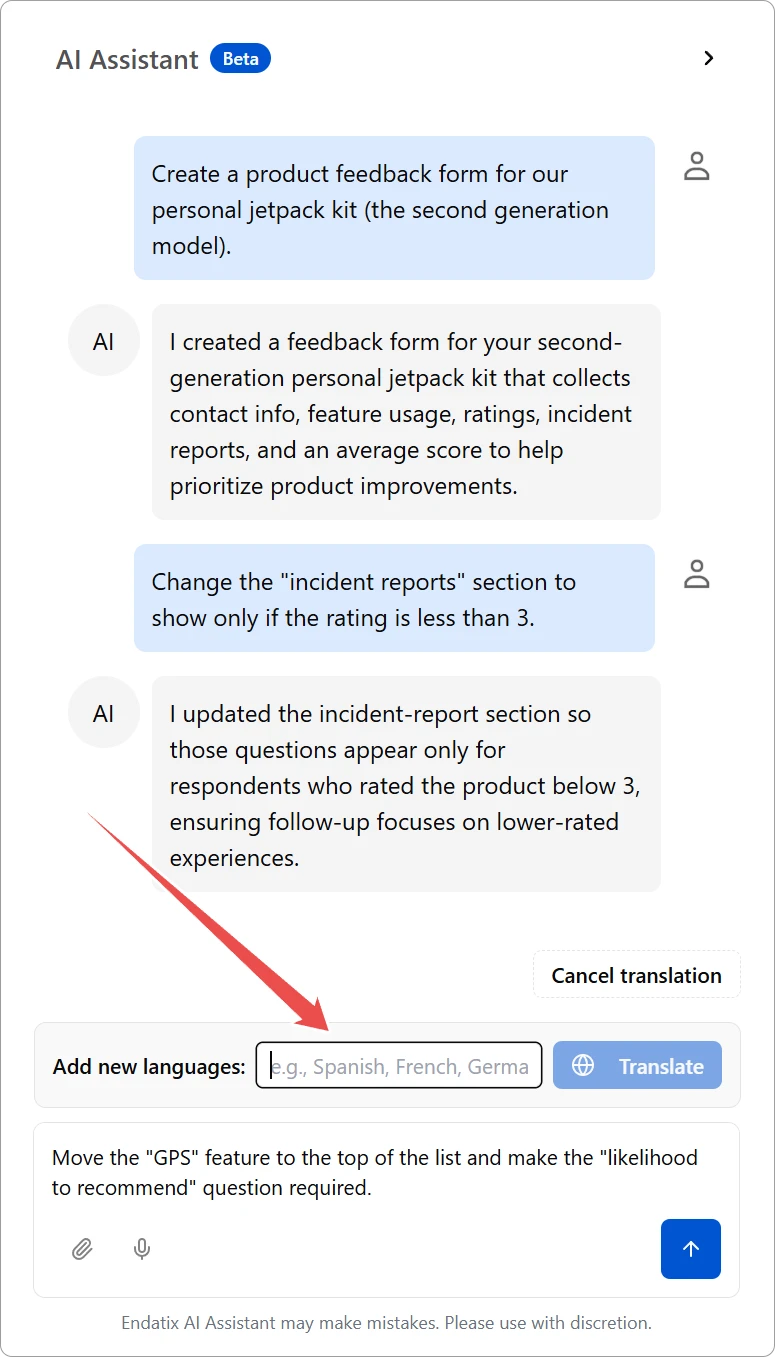
The AI will analyze your form's current content—including questions, choice options, and descriptions—and automatically generate translations for every selected locale. For a standard-sized form, this process is typically completed in just a few seconds.
Reviewing the Output
While the Endatix AI is powerful and efficient, automated translations may not always capture the specific nuance or tone required for your audience. We strongly recommend treating the AI output as a first draft.
Best Practices:
- Human Review: Always review the translated strings in the Translation tab or Designer view to ensure accuracy.
- Context Checks: Verify that short words (like "No" or "Date") are translated correctly according to the context in which they appear.
- Brand Voice: AI may default to a formal or informal tone that might differ from your brand's style guide. This can be adjusted through the systems AI prompts within the admin interface.
The AI Assistant creates the standard translation entries in your form's configuration. You can edit any of the AI-generated text manually at any time using the standard translation tools.