External Authorization
External authorization allows you to use external identity providers (like Keycloak) for role-based access control (RBAC) in your Endatix application. This guide explains the concepts, benefits, and how external authorization works.
Introduction
What is External Authorization?
External authorization is an approach where authorization decisions are made based on data retrieved from external identity providers rather than embedding all authorization information directly in the Endatix Database. This allows external providers to manage roles and permissions and Endatix to use them for authorization decisions.
Why Use External Authorization?
External authorization offers several advantages:
- PII protection: Sensitive information is not included in JWT tokens (no roles, permissions, claims, etc.)
- Dynamic authorization: Authorization data is retrieved from the external provider on demand, so it can be updated without reissuing JWT tokens
- Centralized management: Roles and permissions managed in external systems
How does it work?
External authorization works by using token introspection to retrieve authorization data from the external provider This keeps the JWT token small and secure allowing smaller cookie size and hiding PII from the token. The diagram below illustrates the flow using Keycloak as the external provider:
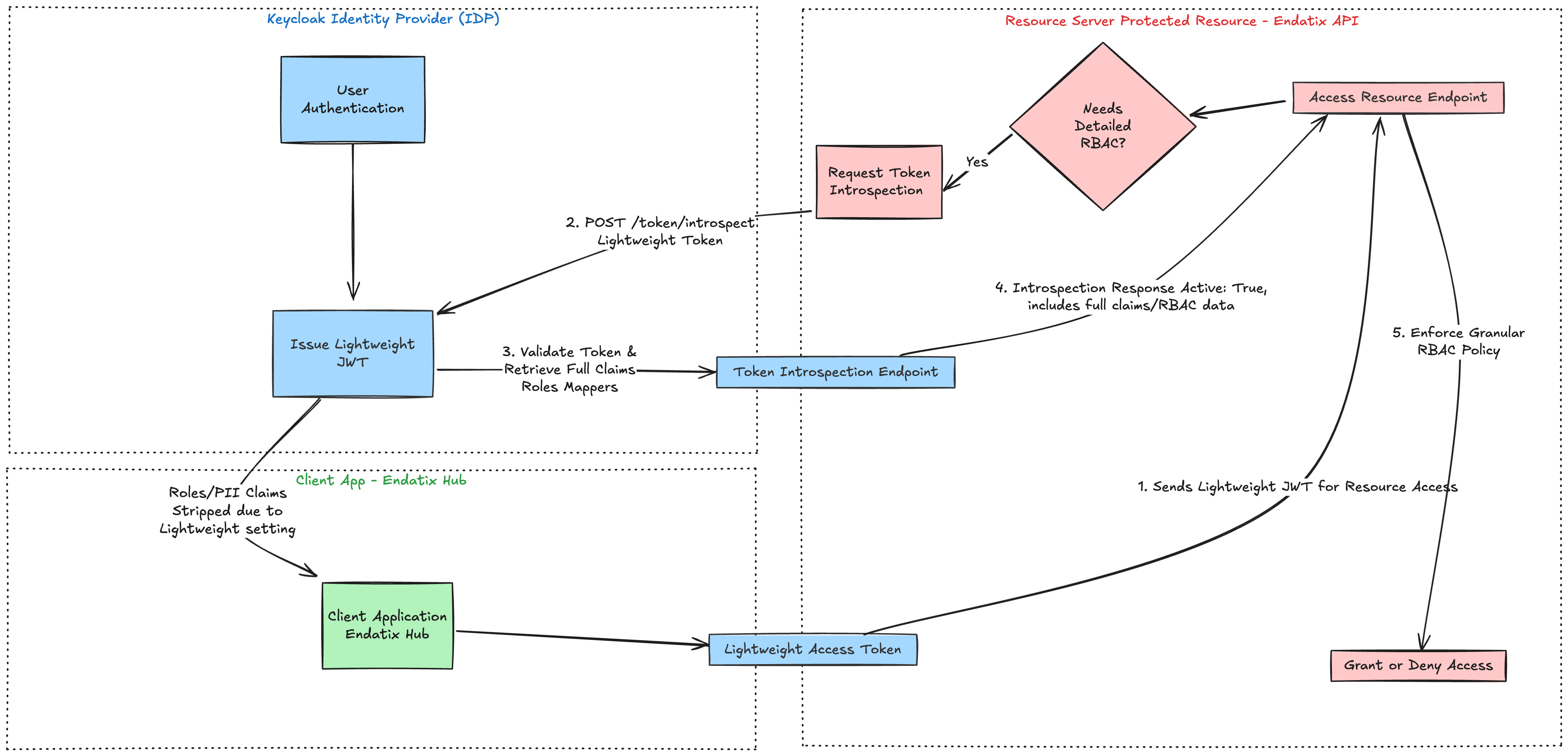
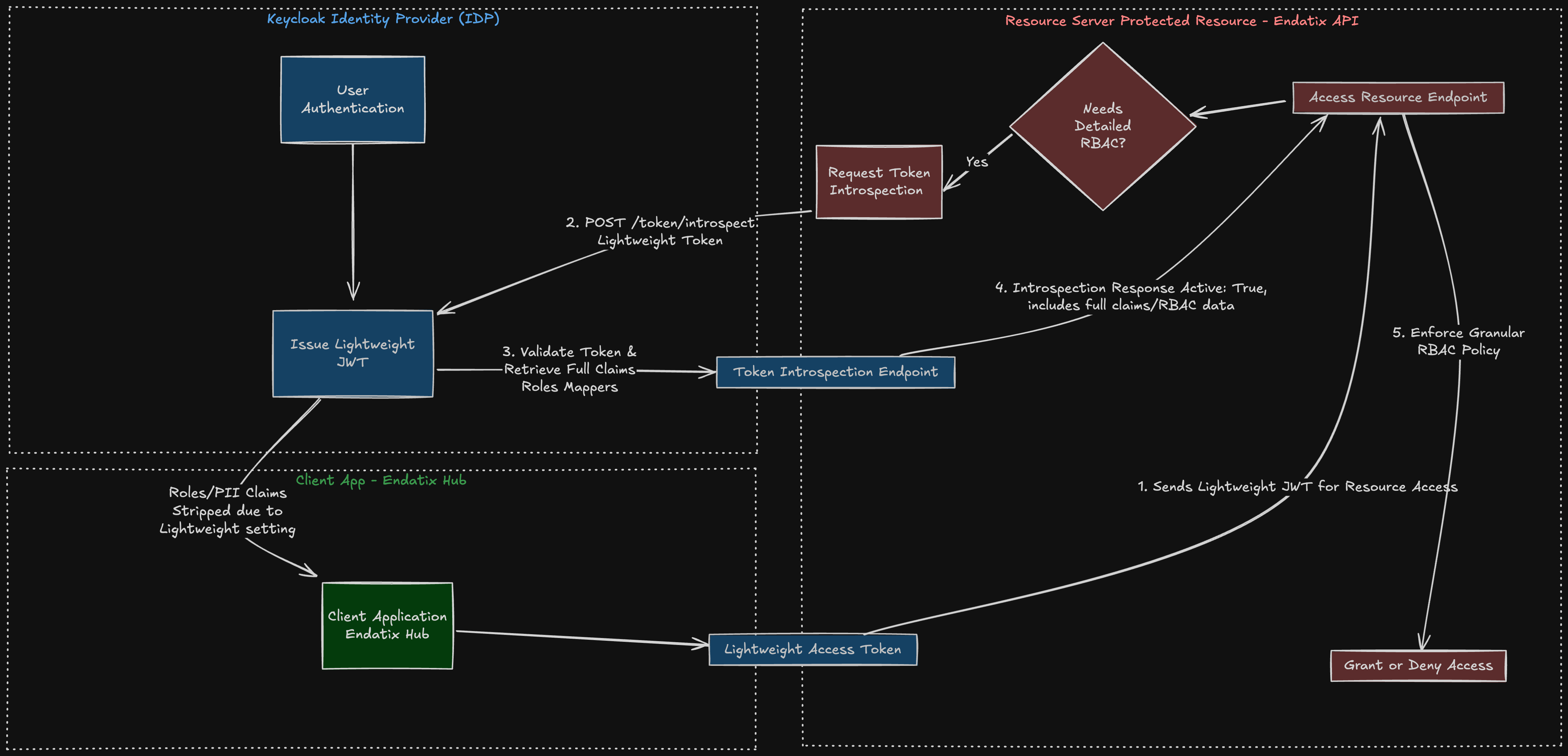
For this example, the user is already authenticated via Keycloak. As a result, Keycloak has issued a Lightweight JWT Access Token to the Client Application (“Endatix Hub”). This token deliberately excludes sensitive information and bulky claims (like many roles/permissions), reducing the data payload & minimizing PII disclosure
Now, the client app needs to make a request to the resource server (“Endatix API”) to request a protected resource, e.g. access Endatix Hub dashboard or direct API call to GET forms list. This happens with an HTTP request with the JWT token attached as authorization header. Here are the logical steps:
- Client Uses Token: The Client sends this lightweight token to the Protected Resource (Resource Server) to access a service.
- Token Introspection Request: The Protected Resource recognizes the token is lightweight (or opaque) and needs the full claims for granular RBAC (Role-Based Access Control) decisions. It makes an authenticated POST request to Keycloak's Introspection Endpoint (
/token/introspect), submitting the lightweight token string (https://www.keycloak.org/securing-apps/oidc-layers#_token_introspection_endpoint) - Validation and Claim Retrieval: Keycloak validates the token and on success returns a response with a full set of claim values based on the configured Protocol Mappers, for which "Add to token introspection" is enabled.
- Introspection Response: Keycloak returns the Introspection Response, which is a JSON document containing the token's active state (active: true) along with the full set of claims, including the necessary RBAC details (roles, permissions, scopes, etc.).
- RBAC Enforcement: The Resource Server ("Endatix API") uses this complete, validated authorization data from the introspection response to enforce its access policies and make the final grant or denial decision. In specific, it will use the roles and permissions returned from the introspection response and map them to the Endatix internal role system to hydrate the current user's context with authorization data. Using this data, the API will be able to determine if the user has access to the requested resource and return the appropriate response.
Endatix uses an abstraction layer to handle the external authorization data. Current strategy uses token introspection to retrieve the authorization data from the external provider. But the IAuthorizationStrategy ( GitHub link) interface allows you to implement your own strategy to retrieve the authorization data from the external provider e.g. fetch from custom database or external API.
Key Concepts
Token Introspection
Token introspection is the process of querying an authorization server to get detailed information about a token, including:
- Token validity and expiration
- User information
- Roles and permissions
- Scopes and claims
Instead of including all this information in the token itself, it's retrieved on-demand via a secure introspection endpoint. Authorization and Identity provider solutions like Keycloak already support this. More info at Keycloak Keycloak Token Introspection Endpoint documentation.
Lightweight Tokens
Lightweight tokens contain only essential claims needed for basic validation:
- exp: Expiration time
- iat: Issued at
- jti: JWT ID
- iss: Issuer
- typ: Type
- azp: Authorized party
- sid: Session ID
- scope: Scopes granted
Role and permission information is excluded and retrieved via token introspection when needed.
Role Mapping
Role mapping translates roles from external identity providers to your application's internal role system:
External Role → Application Role
"admin" → "admin"
"manager" → "creator"
"org manager" → "platformAdmin"
This allows you to:
- Use different role names in your application
- Support multiple external providers with different role structures
- Maintain flexibility in your authorization model
Best Practices
Security
- Use HTTPS: Always use HTTPS for token transmission and introspection
- Secure Storage: Store client secrets securely (environment variables, secrets manager)
- Token Validation: Always validate token signature and claims
- Audit Logging: Log authorization decisions for security auditing
Performance
- Caching: Cache introspection results appropriately
- Token Lifetime: Use appropriate token expiration times
- Connection Pooling: Reuse HTTP connections for introspection calls
- Error Handling: Implement proper error handling and retries
Configuration
- Role Mapping: Keep role mappings simple and maintainable
- Paths: Use clear, consistent JSON paths for role extraction
- Documentation: Document your role mapping strategy
- Testing: Test role mappings thoroughly
Provider-Specific Guides
Keycloak
For step-by-step Keycloak setup instructions:
- Keycloak RBAC Setup - Complete guide for configuring Keycloak RBAC with token introspection
Future Providers
As Endatix adds support for additional external authorization providers, guides will be added here.
Next Steps
- Set up Keycloak RBAC for your application
- Learn about Session Bridge for cross-platform authentication
- Review Authorization overview for general authorization concepts