Subfolder Deployment
Subfolder deployment refers to the public URL shape of your Endatix applications. It applies when the Endatix Hub, the API, or both are exposed under path prefixes rather than at the root of dedicated domains. For example:
- Hub under a path:
https://yourdomain.com/app - API under a path:
https://yourdomain.com/api - API under a deeper domain-agnostic path:
https://{any-domain}/your/subfolder/path/api
While this setup almost always requires a reverse proxy or cloud gateway, the concepts are logically separate:
- Subfolder deployment configures application-level URL generation and internal routing prefixes.
- Reverse proxy deployment configures the network edge, handling forwarded headers, scheme preservation, and TLS termination.
For the required proxy headers and Endatix:Hosting API settings, you must read the Reverse Proxy Deployment guide in conjunction with this page. Hub keys (NEXT_PUBLIC_BASE_PATH, AUTH_URL): Hub environment variables.
Common Topologies
Hub and API on One Domain (Recommended)
The most common and straightforward setup serves the Hub under /app and the API under /api. The browser communicates with a single origin, and the proxy routes traffic based on the path prefix:
| Public path | Application |
|---|---|
/app/* | Endatix Hub (Next.js) |
/api/* | Endatix API (.NET) |
This approach allows you to consolidate multiple services under a single domain while maintaining security, simplifying SSL certificate management, and entirely avoiding Cross-Origin Resource Sharing (CORS) complexities for Hub-to-API browser requests.
API-Only Subfolder
A subfolder setup dedicated solely to the API is useful when the API must work behind different customer domains, tenant domains, or gateway hostnames without altering the underlying API code.
Example Diagram
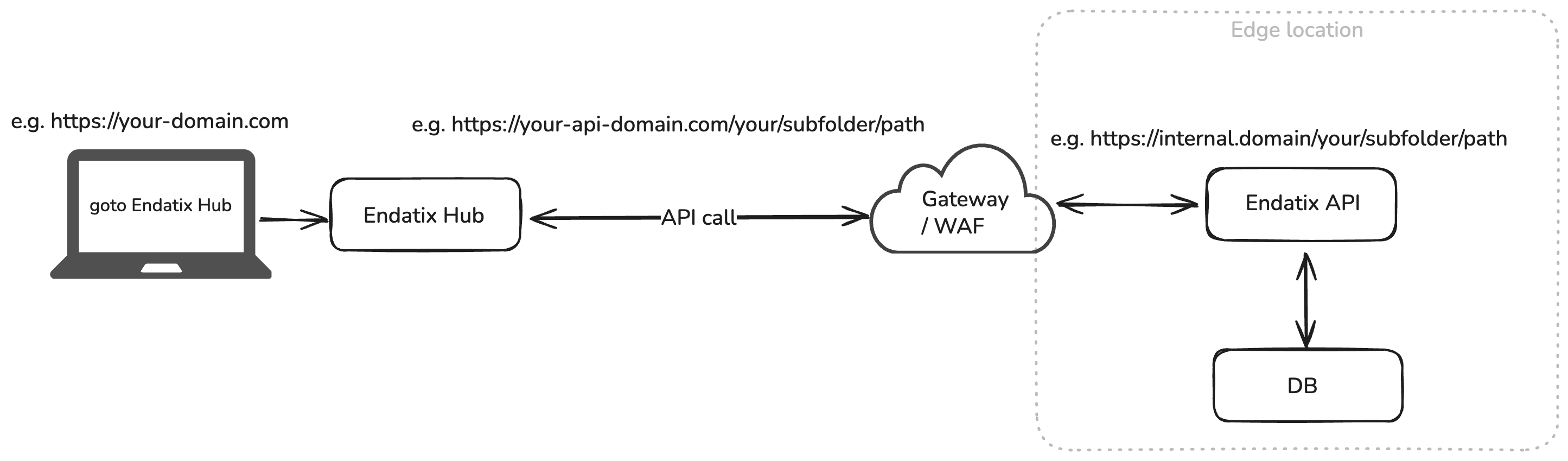
In this model, the Gateway/WAF component owns the external URL shape and routes the deep path prefix to the API backend. The "Edge Location" can represent various deployment scenarios, including:
- Reverse proxies such as Nginx, Apache, or HAProxy.
- Cloud Load Balancers / Application Gateways (e.g., Azure App Gateway, AWS ALB).
- Content Delivery Networks (CDNs) using edge routing rules.
- Web Application Firewalls (WAFs) for security and threat protection.
The gateway owns the external prefix and forwards requests to the API using the standard Endatix API route shape:
| Public request | Backend request sent to Endatix API |
|---|---|
https://{any-domain}/your/subfolder/path/api/* | /api/* |
The critical detail here is that the gateway must strip the deployment prefix (/your/subfolder/path) before forwarding the request to the internal .NET server. The API should still receive paths that begin with /api.
Gateway responsibilities for this topology:
- Match the public API prefix (e.g.,
/your/subfolder/path/api/*). - Strip the deployment prefix before forwarding, ensuring the internal API receives
/api/*. - Preserve the public host and scheme using
X-Forwarded-*headers.
If the Hub calls this API from a separate deployment, point the Hub at the full public API shape in your environment variables:
ENDATIX_BASE_URL=https://yourdomain.com
ENDATIX_API_PREFIX=/your/subfolder/path/api
Hub Configuration (Next.js)
By default, Next.js assumes it is hosted at the root of a domain (/). When the Hub is deployed under a path prefix, you must configure it with a specific basePath.
Update the Hub's environment variables (.env.local or your container environment) to include the NEXT_PUBLIC_BASE_PATH and ensure the API URLs match the public origin:
NEXT_PUBLIC_BASE_PATH=/app
ENDATIX_BASE_URL=https://yourdomain.com
ENDATIX_API_PREFIX=/api
AUTH_URL=https://yourdomain.com/app/api/auth
AUTH_TRUST_HOST=true
For local testing via a reverse proxy (e.g., on port 8080), the configuration looks like this:
NEXT_PUBLIC_BASE_PATH=/app
ENDATIX_BASE_URL=http://localhost:8080
ENDATIX_API_PREFIX=/api
AUTH_URL=http://localhost:8080/app/api/auth
AUTH_TRUST_HOST=true
NEXT_PUBLIC_BASE_PATH is a build-time setting in Next.js. You must rebuild the Hub application (npm run build) after changing this value for it to take effect.
API Path Routing (.NET)
When placing the Endatix API behind a proxy that uses a path prefix (like /api), you must inform the .NET application pipeline about this base path. While Endatix controllers inherently use the api/ route prefix, supporting tools like Swagger UI rely on knowing the application's base path to generate correct relative links for assets (CSS/JS) and API calls.
To ensure Swagger and relative URL generation work correctly behind your proxy, update your Program.cs file in the API project to include UsePathBase() before app.UseEndatix():
var builder = WebApplication.CreateBuilder(args);

builder.Host.ConfigureEndatix();

var app = builder.Build();

// Inform .NET that it is hosted under the /api prefix behind the proxy
app.UsePathBase("/api");

app.UseEndatix();

app.Run();
(Note: Do not include the trailing slash in UsePathBase).
Static Assets
When writing custom Hub components, any static asset URLs or manually generated metadata URLs must respect the base path.
Prefer using Next.js central helpers or prefixing URLs with your base path variable rather than hardcoding root-relative paths. For example, a hardcoded /assets/logo.svg will resolve to yourdomain.com/assets/logo.svg (which will return a 404), instead of the correct yourdomain.com/app/assets/logo.svg.
Different Subdomains (Alternative Topology)
If the Hub and API are deployed under completely different subdomains rather than subfolders, no Hub basePath is required.
- Hub:
https://app.yourdomain.com - API:
https://api.yourdomain.com
Configuration:
# Leave NEXT_PUBLIC_BASE_PATH empty
NEXT_PUBLIC_BASE_PATH=
ENDATIX_BASE_URL=[https://api.yourdomain.com](https://api.yourdomain.com)
ENDATIX_API_PREFIX=/api
AUTH_URL=[https://app.yourdomain.com/api/auth](https://app.yourdomain.com/api/auth)
AUTH_TRUST_HOST=true
Because browser requests will cross origins in this topology, you must explicitly configure CORS settings on the Endatix API to allow requests from https://app.yourdomain.com.