Question Loops
The Question Loops feature allows you to automatically generate a series of repeating questions (a "loop") based on answers provided in previous sections of a form or survey. This eliminates manual redundancy and is ideal for scenarios such as:
- Market Research: Asking respondents to rate specific attributes for every product they claimed to use in a previous question.
- Recruitment: Prompting candidates to list start dates, end dates, and duties for each past employer they add.
- Event Registration: Collecting dietary restrictions and workshop preferences for each additional guest a main attendee registers.
In Endatix Hub, Question Loops are created using the Dynamic Panel widget. Simply place the questions you want to loop inside the Dynamic Panel template and configure the settings as shown below.
Prerequisites
- Set
"questionsOnPageMode": "inputPerPage"within the survey JSON configuration or select the “Single input field per page” mode in the Navigation section of the Property Grid (See Form Display Modes):
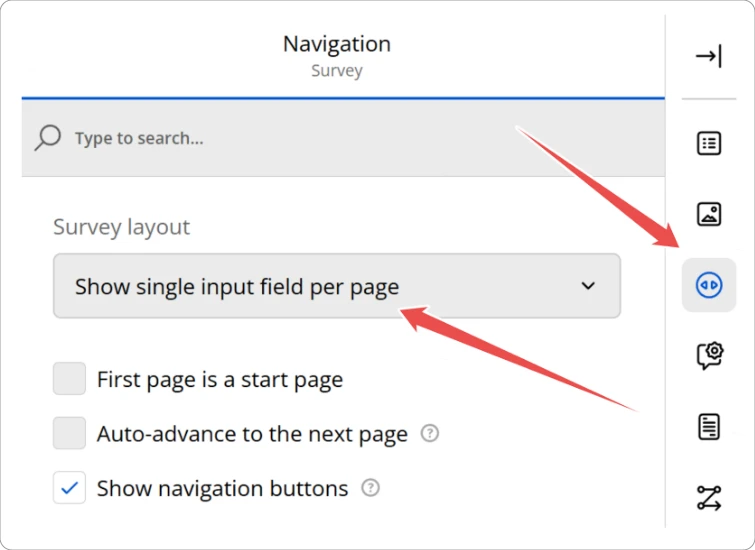
- Set
"allowAddPanel": falseand"allowRemovePanel": falseto disable manual addition or removal of panels to the Dynamic Panel widget:
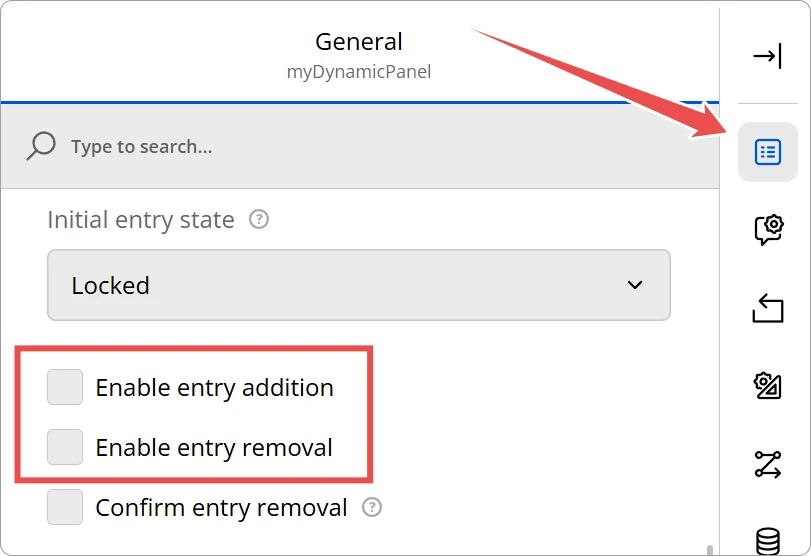
Loop Configuration Guide
To configure the loop, select the Dynamic Panel widget and locate the Question Loops category in the Property Grid:
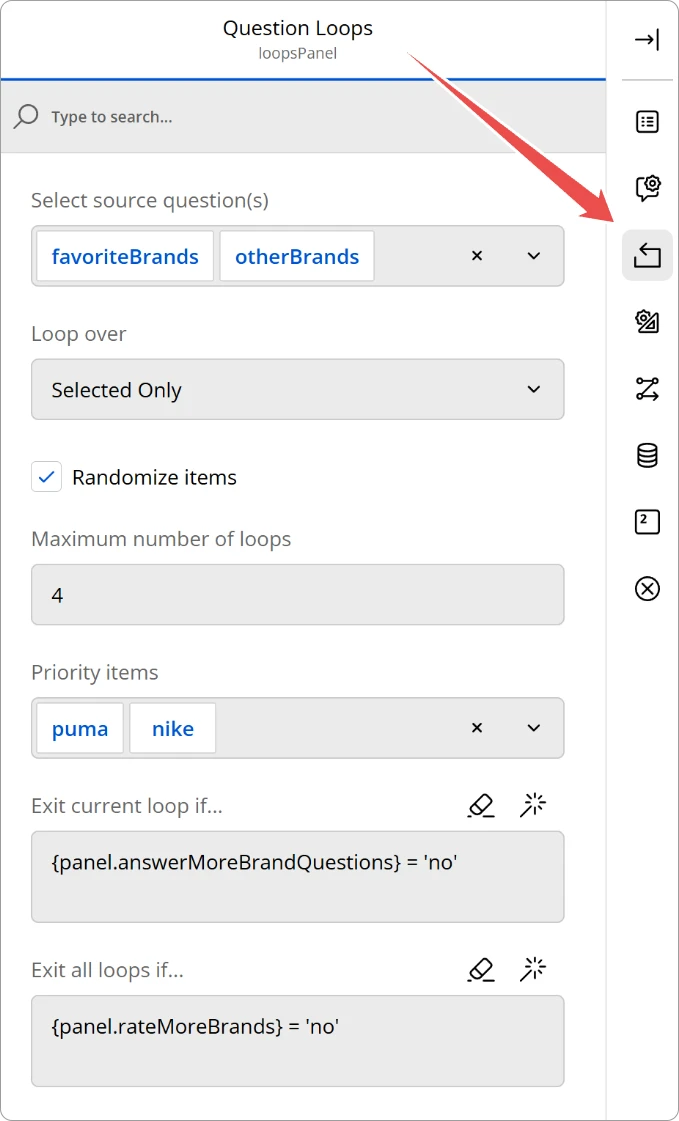
Properties Reference
| Property | Description | Options |
|---|---|---|
| Select source question(s) | Choose which question(s) should drive this loop. You can select multiple sources. If multiple sources contain choices with the same ids, only one instance of the choice will be included in the final list. | Any Checkbox, Tag Box, or Radio Group question. |
| Loop over | Defines which items from the source questions trigger a panel. | Selected Only: Only items the user checked. Unselected Only: Only items the user left blank. |
| Randomize items | If enabled, the order of the generated panels will be shuffled for every respondent. | Toggle (True/False). |
| Priority items | Select specific items that should always be included in the loop, even if randomization is turned on and the number of loops is limited. | Multi-select list of all source choices. |
| Max number of loops | Limits the total number of panels shown. Priority items are always included in this count. | Number (0 = unlimited). |
| Exit current loop if… | Optional condition that determines whether the current loop should be terminated and the next loop should start immediately. | A valid SurveyJS expression. Questions inside the dynamic panel’s template must be prefixed with “panel.” (e.g. |
| Exit all loops if… | Optional condition that determines whether all loops should be terminated. |
Text Piping and Expression Keywords
To provide context to the user within the loop, or to apply logic, you can use special keywords:
- Current loop index -
{panel.loopIndex} - Current loop item’s value -
{panel.itemValue} - Current loop item’s text -
{panel.itemText}
Text Piping Example
In the Title or Description of any question inside your Dynamic Panel, use the placeholder {panel.itemText}.
- Example Title: "How often do you use
{panel.itemText}?" - At Runtime: If the loop is currently on "Nike", the user will see: "How often do you use Nike?"
Conditional Logic Example
{panel.ItemValue} = ‘brand1’ and {panel.question3} = ‘yes’
Technical Reference (JSON Schema)
Advanced users and developers can configure loops directly in the survey JSON. The custom properties are added to the paneldynamic question type.
{
  "type": "paneldynamic",
  "name": "brand_feedback_loop",
  "title": "Feedback Loop",
  "loopSource": ["source_q1", "source_q2"],
  "choicePattern": "Selected Only",
  "randomizeLoop": true,
  "priorityItems": ["brand_apple"],
  "maxLoopCount": 5,
  "exitLoopCondition": "{panel.moreBrandQuestions} = 'no'",
  "exitAllLoopsCondition": "{panel.reviewMoreBrands} = 'no'",
  "templateElements": [
    {
      "type": "rating",
      "name": "quality_rating",
      "title": "How would you rate the quality of {panel.itemText}?"
    },
    {
      "type": "comment",
      "name": "feedback_text",
      "title": "Tell us more about {panel.itemText}:"
    }
  ]
}
Property Data Types
| Property | Type | Accepted Values |
|---|---|---|
loopSource | Array<string> | Names of the questions to drive the loop. |
choicePattern | string | "Selected Only", "Unselected Only", "All" |
randomizeLoop | boolean | true, false |
priorityItems | Array<string> | Values of the specific choices that must be included. |
maxLoopCount | number | Any positive integer (0 for unlimited). |
exitLoopCondition | string | Any valid SurveyJS expression |
exitAllLoopsCondition | string |