Localization Overview
Endatix Hub offers comprehensive multi-language support, allowing you to create a single form instance that dynamically adapts to the respondent's preferred locale.
What Can Be Localized?
Endatix provides granular control over every text element within the form's contents and user interface.
Survey Content
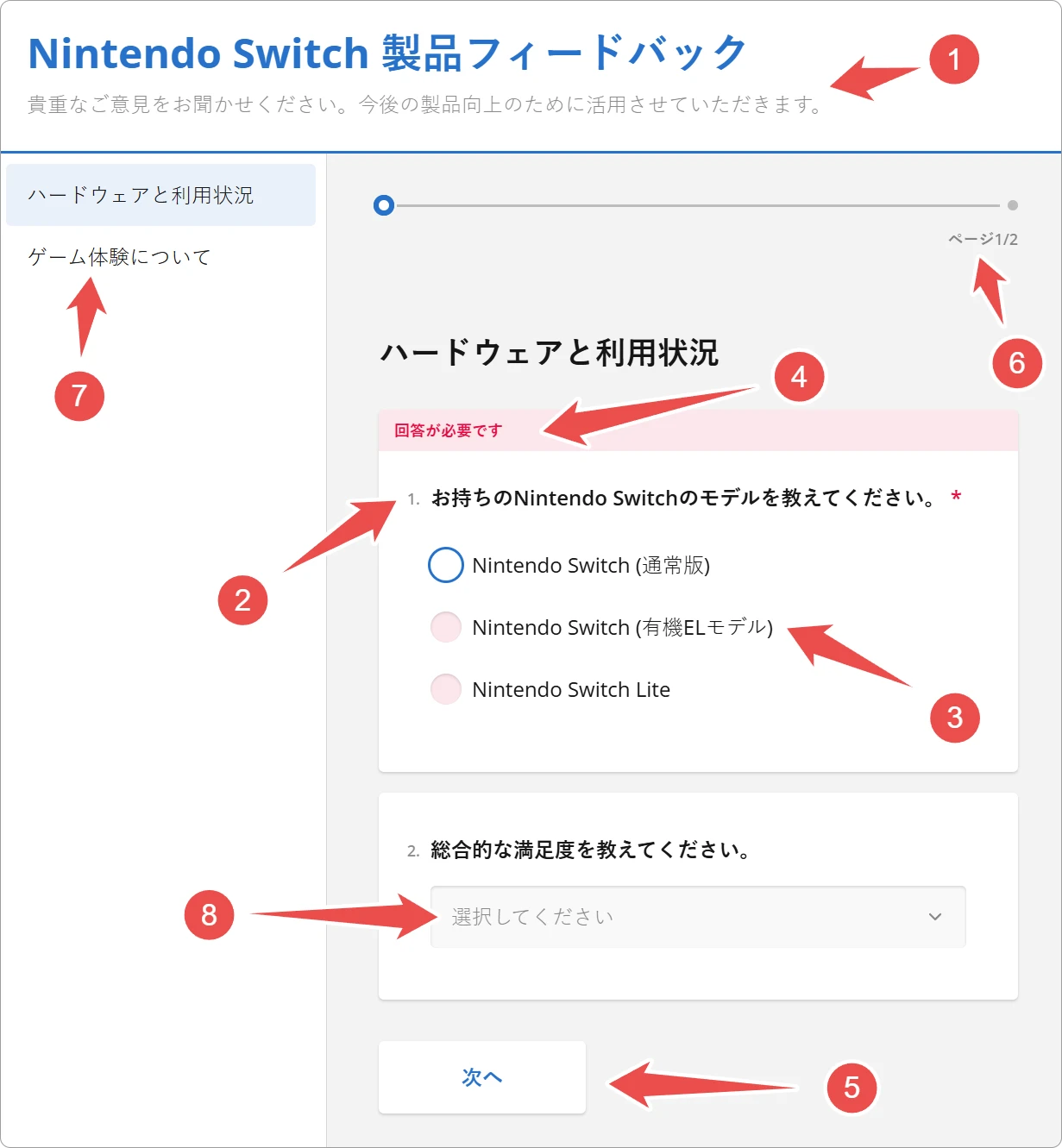
- Form title and description (1)
- Question title and description (2)
- Choice options (3) (Localize the answers in Dropdowns, Radio Groups, and Checkboxes)
- Html Elements (Any static HTML blocks used for instructions or formatting can be defined per language)
Navigation & UI Elements
- Validation messages (4) (e.g., "This field is required" or "Please enter a valid date")
- Navigation buttons (5) (e.g., "Next", "Previous", and "Complete")
- Progress bar (6)
- Table of contents (7)
- Placeholders and hints (8) (e.g., "Select a choice...")
Setting a Default Language
Every localized form requires a designated Default Language. This acts as the fallback locale for respondents whose browser preferences do not match any of the translated languages you have provided. For instance, if you support English and French, but a user accesses the form with a Spanish browser setting, the form will render in the default language to ensure the content remains accessible. In the survey configuration, this is defined by the locale property, which establishes the baseline text against which all other translations are mapped.
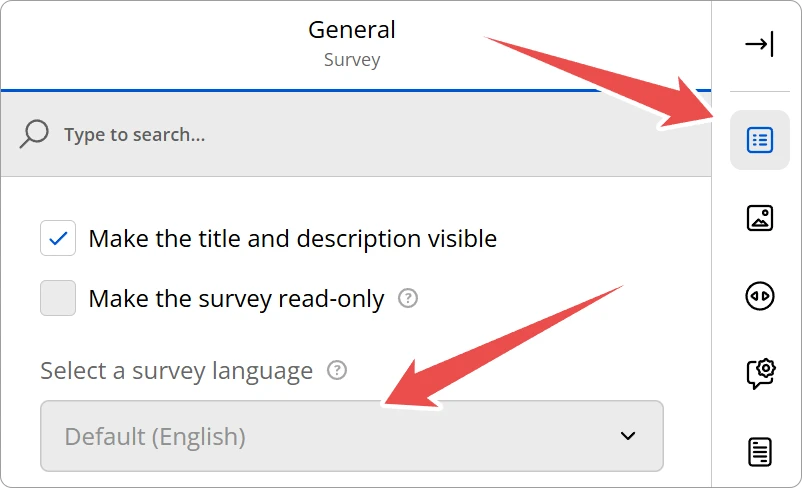
The default language is considered the first language the form was designed in. If you don't specify a language the default will be English. The default language can also be set through the form builder as shown below:
Supported Languages and Standards
Endatix Hub supports any language compatible with web standards. There is no hard limit to the number of languages you can add to a single form.
Locale Standards
We utilize standard IETF BCP 47 language tags (e.g., en-US, fr-CA, de, ja).
This ensures compatibility with browser language preferences, allowing Endatix to automatically serve the correct language based on the user's browser settings when possible.
Language Selection
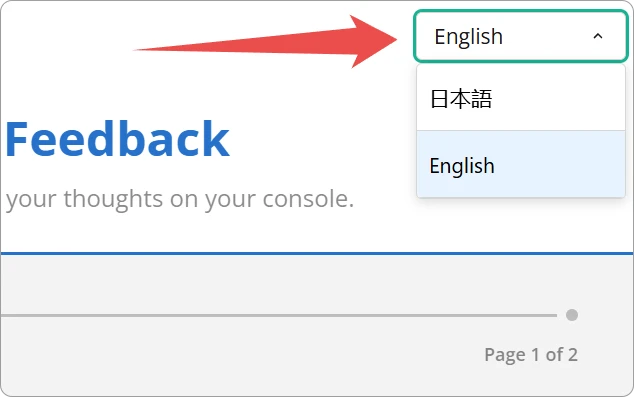
When multiple languages are configured, a language selector dropdown appears automatically in the form header. On the "live" form page the laungage is automatically selected based on the browser's locale setttings.
Language Selector for Published Forms
If a form contains more than one language a dropdown selector automatically appears in the upper right corner of the screen:
Preview Translated Forms
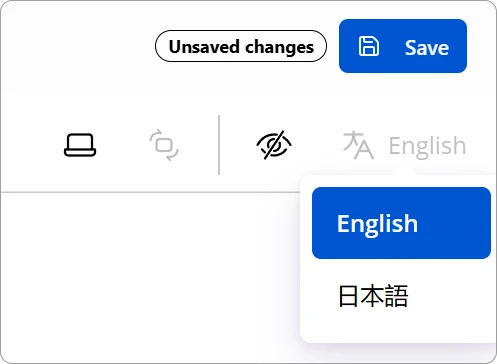
Similar to published forms, a language selector is availble in the preview tab of the form builder:
Right-to-Left (RTL) Support
For languages such as Arabic, Hebrew, or Persian (Farsi), Endatix Hub forms include native Right-to-Left (RTL) support.
When an RTL language is selected:
- Text Alignment: All questions, answers, and descriptions automatically align to the right.
- UI Mirroring: Navigation elements, progress bars, and matrices are mirrored to match the reading direction.
- Input Logic: Text input fields automatically adjust to RTL typing modes.
RTL adjustments happen automatically based on the selected locale. No additional CSS configuration is required.
Technical Reference (JSON Schema)
For advanced users and developers, localization is handled within the survey JSON object. Instead of a single string, localizable properties become objects containing key-value pairs for each locale.
{
 "locale": "fr",
 "title": {
  "default": "Customer Feedback",
  "fr": "Commentaires des clients",
  "de": "Kundenfeedback"
 },
 "pages": [
  {
   "name": "page1",
   "elements": [
    {
     "type": "text",
     "name": "email_address",
     "title": {
      "default": "Your Email",
      "fr": "Votre e-mail",
      "de": "Ihre E-Mail"
     },
     "isRequired": true,
     "requiredErrorText": {
      "default": "Email is required",
      "fr": "L'e-mail est obligatoire",
      "de": "E-Mail ist erforderlich"
     }
    }
   ]
  }
 ]
}
Property Data Types
| Property | Type | Description |
|---|---|---|
locale | string | The fallback language used if a translation is missing (usually "en"). |
[Any Text Property] | string | object | Can be a simple string (for single language) or an object mapping locale codes to strings. |
Topics
📄️ Form Translation
Learn how to translate your Endatix forms using the Designer and Translation tabs, including CSV export and import capabilities.
📄️ AI Translation
Leverage the power of the Endatix AI Assistant to instantly translate your forms into multiple languages.
📄️ Translating with Microsoft Excel
Learn how to properly import Endatix translation CSV files into Microsoft Excel to ensure character encoding is preserved.